Advertisement
 Level design
Creating Rain or Snow
These are all the available keys for the worldspawn:
This is really a quite easy thing to add. All you have to do is to load up your map. When your map has finished loading just select any worldspawn brush and hit N to open the Entity window. Now to add rain or snow you need to add two keys to the worldspawn.
Add enablePrecip into the 'Key' field and then enter either 1 for rain, or 2 for snow into the 'Value' field. Hit the Enter key to apply.
Next you have to define the amount of snow/rain you want to fall. To do this enter precipAmount into the 'Key' field and the amount of flakes/drops you want to fall into the 'Value' field. This is a number between 1 and 1024. After this is done You should have something like this:
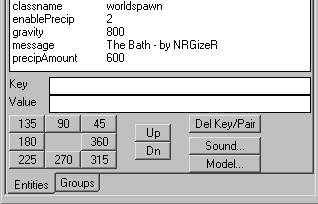
Note that when using these keys in the worldspawn, snow or rain will fall from all places in the map where the sky is visible.
| message | Text to print at user logon. Used for the name of your level. |
| ambient | Adds a constant value to overall lighting. Use is not recommended. Ambient light will have a tendency to flatten out variations in light and shade. |
| _color | RGB value for ambient light color. |
| gravity | Gravity of level (default is normal gravity: 800). |
| enablePrecip | 0 - (default) none, 1 - rain, 2 - snow |
| precipAmount | Up to 1024, number of drops/flakes (256 is good) |
This is really a quite easy thing to add. All you have to do is to load up your map. When your map has finished loading just select any worldspawn brush and hit N to open the Entity window. Now to add rain or snow you need to add two keys to the worldspawn.
Add enablePrecip into the 'Key' field and then enter either 1 for rain, or 2 for snow into the 'Value' field. Hit the Enter key to apply.
Next you have to define the amount of snow/rain you want to fall. To do this enter precipAmount into the 'Key' field and the amount of flakes/drops you want to fall into the 'Value' field. This is a number between 1 and 1024. After this is done You should have something like this:
Note that when using these keys in the worldspawn, snow or rain will fall from all places in the map where the sky is visible.
By NulL - Sunday, 29 May 2011 - viewed by 1564 members and 30983 visitors
Sponsored link
